User Settings
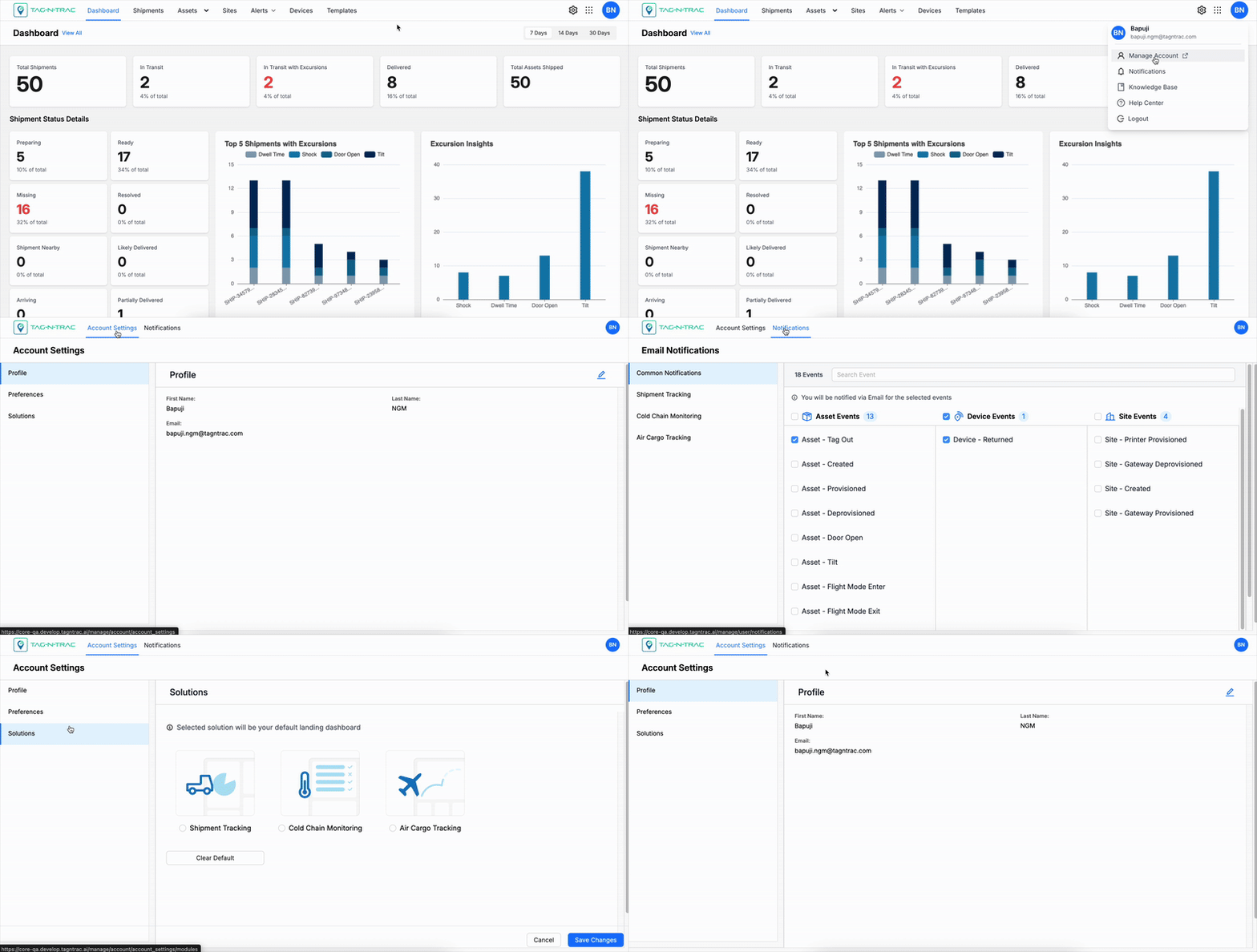
User Settings allow you to manage personal account information and preferences. To access User Settings, select your profile icon in the upper-right corner and choose Manage Account.
Note: Updates made by a super administrator do not overwrite any changes made to your profile in Manage Account. Your personal settings take precedence over global settings applied by super administrators.
Accessing User Settings
To access user settings, select your profile icon in the upper-right corner and choose Manage Account.
The Account Settings page opens in a new window where you can update your profile information, set preferences, and subscribe to platform notifications.
Manage Account
You can update the following:
- Account Settings : Manage personal information and individual preferences that apply only to your account.
- Profile: Edit your name and view your registered email address.
- Preferences: Configure display settings such as temperature scale, timezone, and default views.
- Solutions: Choose which module opens by default when you sign in.
- Notifications: Subscribe to alerts and choose how you receive platform notifications.
Updated 11 months ago
Did this page help you?